Written by the InclusivePay Merchant Advisory Team | Last updated: April 2026
InclusivePay has been setting up CBD merchants on WooCommerce since 2018. This guide explains exactly how the payment stack works, what to avoid, and how to stay live long-term.
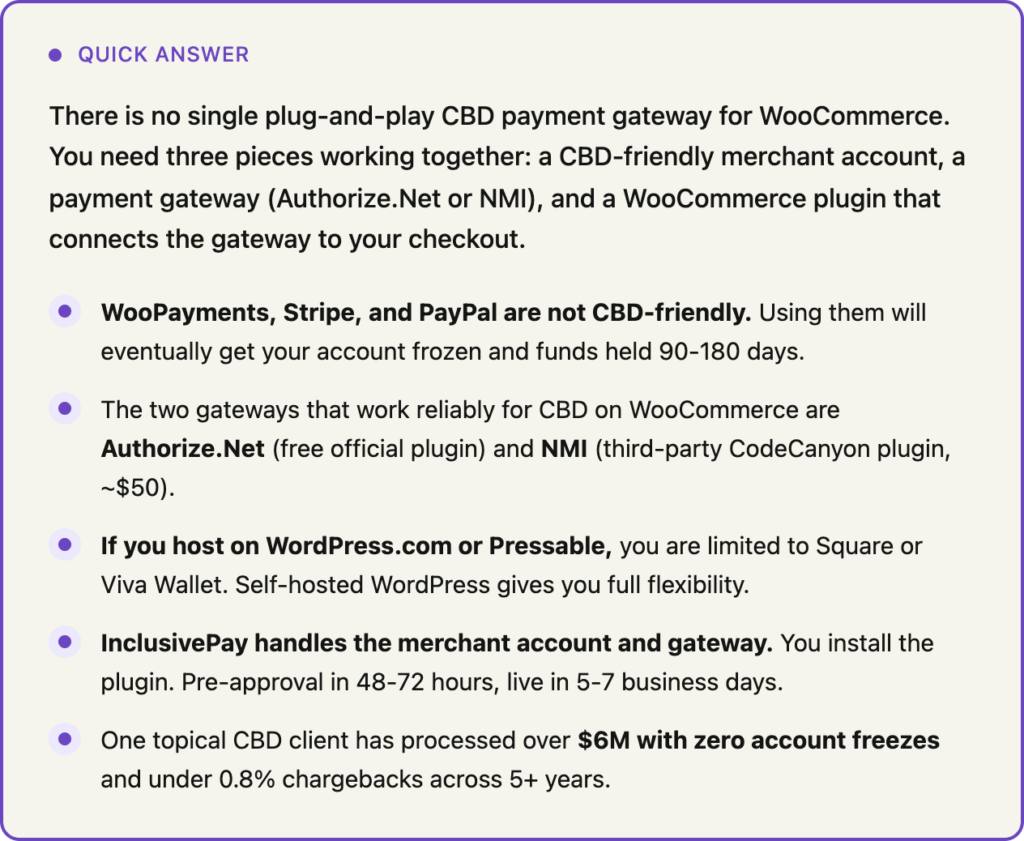
If you’ve been searching for a ‘WooCommerce CBD payment gateway’ and coming up empty, you’re not lost. The confusion is real and it trips up a lot of CBD brands. The reason you can’t find a simple plug-and-play solution is because one doesn’t exist. What you actually need is three separate pieces that work together. Most articles skip this explanation entirely. This one doesn’t.
WooCommerce is actually one of the best platforms for CBD ecommerce because it’s open source, flexible, and doesn’t lock you into a single payment provider. But that flexibility comes with a learning curve. You need to build your own payment stack rather than clicking ‘enable’ on a built-in option. Here’s exactly how to do it.
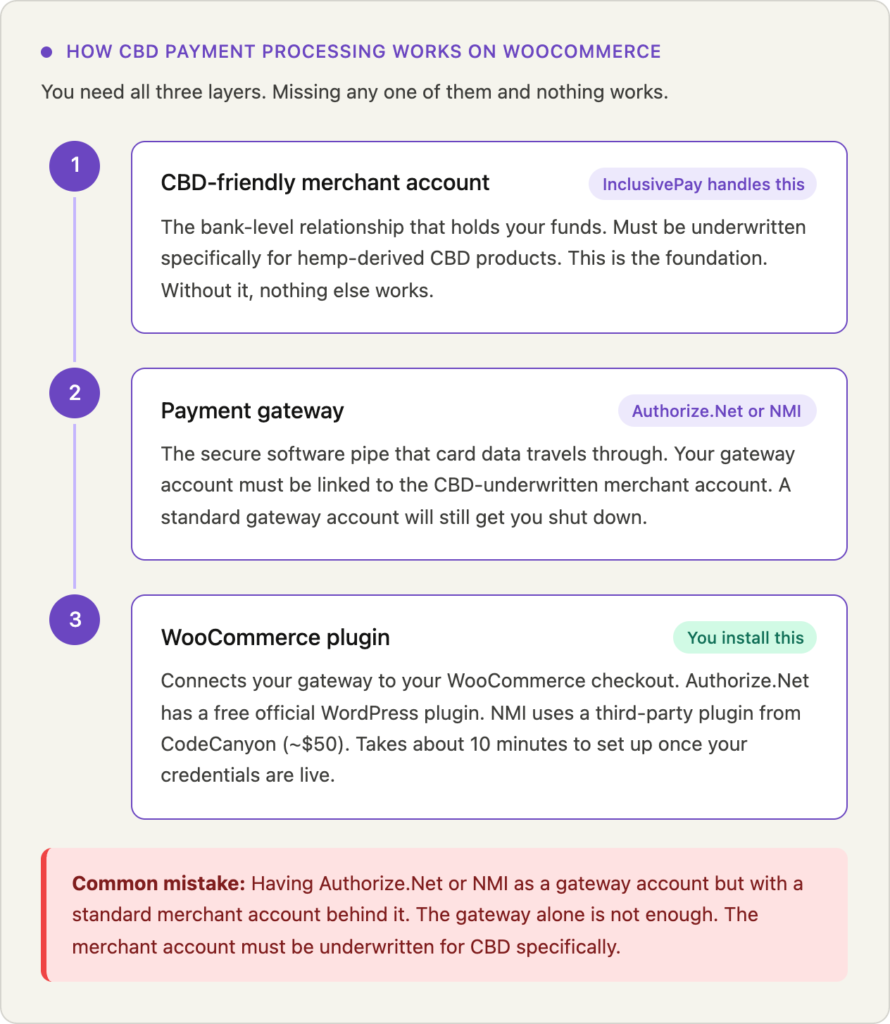
The Three-Layer Stack: How CBD Payment Processing Actually Works on WooCommerce
This is the part nobody explains clearly and it’s the reason so many CBD merchants set things up wrong and end up getting shut down. Standard processors like Stripe bundle all three layers into one product so you never think about them separately. For CBD, you have to understand each layer individually.
Layer 1: The merchant account
This is the actual bank-level relationship that holds your funds and allows you to accept card payments. For CBD, this account must be underwritten specifically for hemp-derived products by an acquiring bank that accepts the category. This is what InclusivePay sets up on your behalf. Without a properly underwritten CBD merchant account, nothing else works.
Layer 2: The payment gateway
The gateway is the software layer that connects your merchant account to the internet. Think of it as the secure pipe that card data travels through. For WooCommerce CBD merchants, the two reliable options are Authorize.Net and NMI. Neither of these are processors themselves. They are gateways. The key is that your gateway account must be linked to a merchant account that is underwritten for CBD, not a standard account.
Layer 3: The WooCommerce plugin
This is the piece that connects your gateway to your actual WooCommerce checkout page. There are free and paid plugins available for both Authorize.Net and NMI. The NMI plugin on CodeCanyon costs around $50 and has excellent reviews from CBD merchants specifically. This is the last piece you install, after your merchant account and gateway are live.
Important: You can have Authorize.Net or NMI as a gateway account but still get shut down if the underlying merchant account is not underwritten for CBD. The gateway alone is not enough. This is one of the most common mistakes CBD brands make.
Why WooPayments, Stripe, and PayPal Will Shut You Down
WooCommerce’s default payment options are WooPayments, Stripe, and PayPal. All three run on the same aggregator model and all three explicitly prohibit CBD in their terms of service.
WooPayments runs on Stripe infrastructure. If you’re on a self-hosted WordPress site selling CBD, WooPayments will eventually flag and terminate your account. The official WooCommerce documentation actually states this directly.
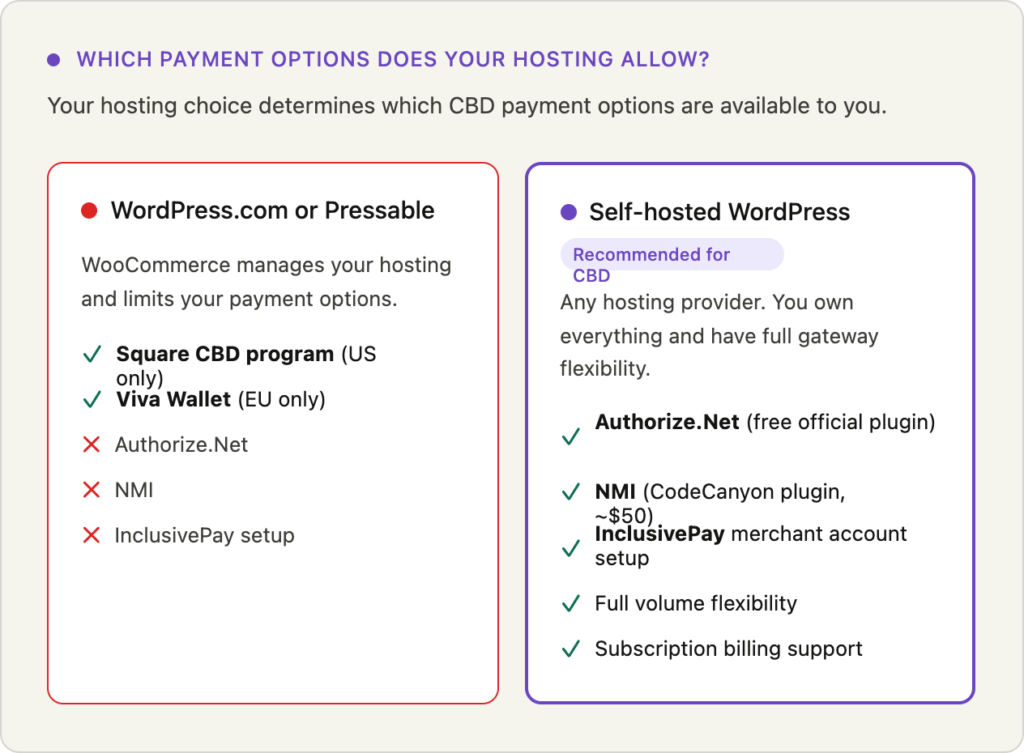
Important hosting note: If you host your WooCommerce store on WordPress.com or Pressable specifically, WooCommerce requires you to use either Square’s CBD program or Viva Wallet as your payment processor. You have no other option on those hosting platforms. If you self-host WordPress anywhere else, you have full flexibility to use Authorize.Net or NMI through a high-risk merchant account.
One Reddit user in r/woocommerce described getting approved through a standard gateway for CBD, processing normally for two months, then waking up to a frozen account and 90-day fund hold with no warning and no appeal. This is not an edge case. It happens constantly.
Authorize.Net vs NMI: Which Gateway is Right for Your CBD WooCommerce Store?
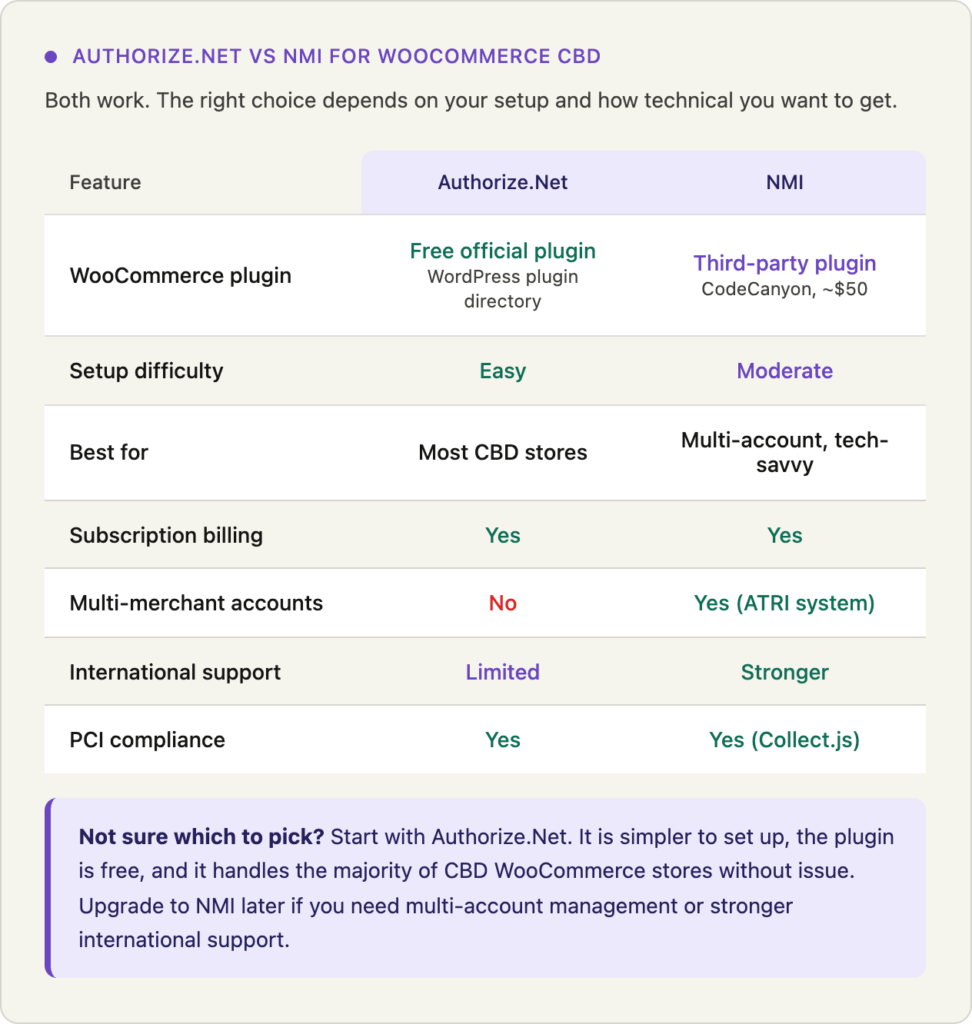
Both gateways work well for CBD on WooCommerce. The choice usually comes down to your technical comfort level and whether you need specific features like multi-merchant account management.
| Feature | Authorize.Net | NMI |
| WooCommerce plugin | Official plugin available | CodeCanyon plugin (~$50) |
| Best for | Simplicity, reliability | Tech-savvy stores, multi-account |
| Subscription billing | Yes | Yes |
| Multi-merchant management | No | Yes (ATRI system) |
| International support | Limited | Stronger |
| Setup complexity | Straightforward | Slightly more technical |
| CBD merchant account needed | Yes, separately underwritten | Yes, separately underwritten |
A note on Authorize.Net: it is owned by Visa and is one of the most widely used gateways in the world. However, a standard Authorize.Net account does not support CBD. You need to access it through a reseller or high-risk merchant account provider like InclusivePay who has an Authorize.Net account specifically underwritten for CBD. Same goes for NMI.
Which plugin to use for NMI: The most recommended WooCommerce NMI plugin is the Network Merchants (Collect.js) Payment Gateway for WooCommerce available on CodeCanyon. It uses Collect.js tokenization which makes it PCI compliant, supports recurring billing, and works with the block checkout. One verified review from a CBD merchant states the plugin worked perfectly with their NMI merchant account with easy setup and fast support.
How InclusivePay Sets Up CBD Payment Processing on WooCommerce
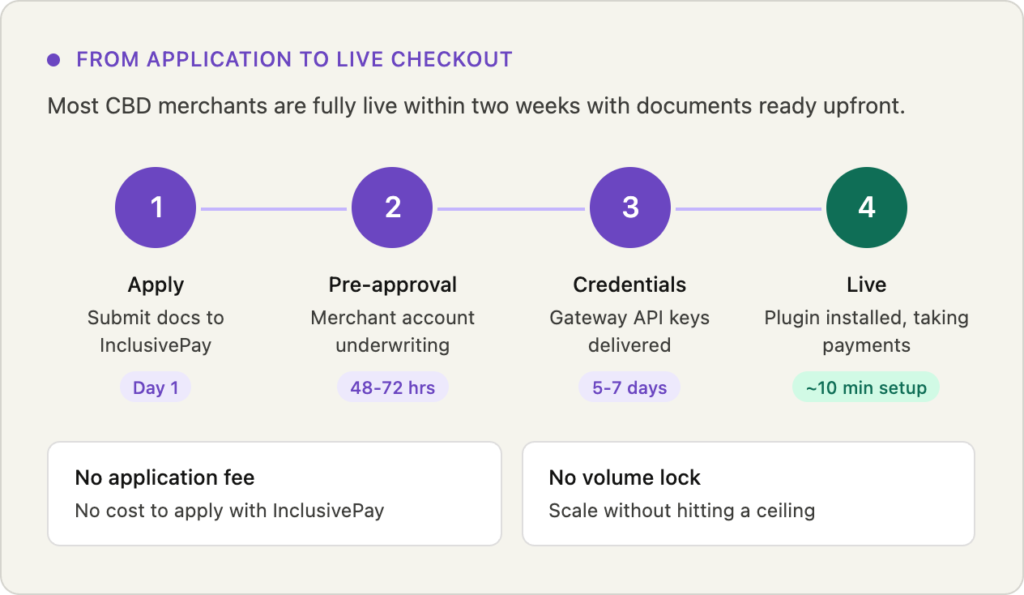
InclusivePay is not a plugin. It is the merchant account and gateway layer. Here is exactly what CBD payment processing setup looks like when you work with InclusivePay:
- You apply with InclusivePay. Pre-approval in 48-72 hours. Full setup in 5-7 business days with documents in order.
- InclusivePay places you with a CBD-friendly acquiring bank and sets up your merchant account underwritten specifically for hemp-derived products.
- You receive your gateway credentials for either Authorize.Net or NMI depending on which fits your store best.
- You install the appropriate WooCommerce plugin and enter your API keys. Most merchants are live within a few minutes of receiving their credentials.
- InclusivePay stays involved after go-live with chargeback monitoring, compliance support, and account stability management. This is the part most processors skip.
Real result: One topical CBD brand has processed over $6M through InclusivePay across 5+ years. Chargeback rate under 0.8%. Never frozen. That is what proper underwriting and ongoing account management looks like.
What You Need Before You Apply
Getting approved is straightforward if you come prepared. These are the documents every CBD merchant account underwriter will ask for:
- Business registration documents – LLC, EIN, articles of incorporation
- Government-issued ID – for all owners
- 3-6 months of business bank statements
- Certificates of Analysis (COAs) – current, third-party lab, for all products
- Product labels – all SKUs
- Live, compliant website – no health claims, clear return policy, privacy policy visible
- Processing statements – if you have prior history, even if terminated
On your website specifically: Underwriters look at your site before approving you. The most common reasons CBD WooCommerce applications get denied are health claims in product descriptions, missing or outdated COAs, no visible return/refund policy, and checkout flows that look incomplete or untrustworthy. Clean all of this up before you apply.
How to Connect Your CBD Merchant Account to WooCommerce
Once your merchant account and gateway are live, the plugin setup takes about ten minutes. Here is the process for NMI:
- Purchase the NMI Gateway for WooCommerce plugin from CodeCanyon (around $50).
- In your WordPress dashboard go to Plugins, click Add New, and upload the plugin file.
- Activate the plugin, then go to WooCommerce, Settings, Payments and click Set Up next to the NMI option.
- Log into your NMI account, click Options, then Security Keys, and generate a new private key.
- Enter your API credentials in the WooCommerce plugin settings.
- Enable sandbox mode first and run a test transaction before going live.
- Once tests pass, switch to live mode. You are now processing.
For Authorize.Net the process is nearly identical. Log into your Authorize.Net account, go to Account, Settings, API Credentials and Keys, and generate your API Login ID and Transaction Key. Enter those in the WooCommerce Authorize.Net plugin settings.
Make sure SSL is active on your site before going live. WooCommerce will warn you if it isn’t but it’s worth confirming independently. No SSL certificate means card data is not encrypted at checkout and most gateways will block live transactions without it.
How to Keep Your CBD WooCommerce Account Stable Long-Term
Getting approved is step one. Keeping your account live is the ongoing job. Most CBD merchant accounts that get terminated after approval do so because of avoidable issues.
- Keep your chargeback rate under 1%. Ideally under 0.8%. Anything above 1% puts you in review territory. Use chargeback alerts and respond to disputes immediately.
- Never exceed your agreed processing volume without notice. If you’re scaling fast, tell InclusivePay before volume spikes. Sudden jumps trigger automated risk reviews.
- Keep COAs current. Most underwriters want COAs within 12 months. If a product’s COA expires, update it before it becomes a problem.
- Don’t add new product categories without checking. Adding delta-8 or higher-THC products to a CBD account without updating your underwriting is a termination risk.
- Keep your website clean. Health claims that sneak into blog posts or product descriptions can trigger a review even if your original application was clean.
FAQs
Is there a WooCommerce plugin that works directly for CBD payments?
Not in the way most people expect. There is no single plugin you install that magically enables CBD payments. You need a CBD merchant account first, connected to a gateway like Authorize.Net or NMI, and then you use a WooCommerce plugin to connect that gateway to your checkout. The plugin alone does nothing without the properly underwritten merchant account behind it.
Can I use WooPayments for CBD?
No. WooPayments runs on Stripe infrastructure and Stripe explicitly prohibits CBD. If you use WooPayments for CBD sales your account will eventually be flagged and terminated. WooCommerce’s official documentation actually acknowledges this and recommends third-party high-risk processors for CBD merchants.
What if I host on WordPress.com?
If you host on WordPress.com or Pressable, WooCommerce limits you to Square’s CBD program or Viva Wallet. Square works for smaller US-based CBD stores but has volume caps and strict compliance monitoring. Viva Wallet is the EU option. If you want full flexibility with Authorize.Net or NMI, you need to self-host WordPress through any other hosting provider.
How long does it take to get set up?
With InclusivePay, pre-approval typically comes in 48-72 hours. Full merchant account setup is usually 5-7 business days with all documents ready. Plugin installation after that takes about 10 minutes. Most merchants go from application to live checkout within two weeks.
NMI or Authorize.Net – which should I choose?
For most CBD WooCommerce stores, Authorize.Net is the simpler choice. It has a well-supported plugin, straightforward setup, and solid reliability. NMI is the better pick if you need to manage multiple merchant accounts under one gateway, want stronger international support, or are comfortable with a slightly more technical setup. InclusivePay can advise which fits your specific product catalog.
What happens if my WooCommerce CBD account gets terminated?
First, do not apply to another aggregator. Gather your termination notice, transaction logs, and processing statements. Check whether you have been MATCH listed. Then apply through a high-risk specialist who can review your history and underwrite you properly. Prior terminations do not automatically disqualify you as long as the reason was not fraud or excessive chargebacks.
Can I use InclusivePay if I also sell non-CBD products?
Yes. Mixed product catalogs are common. Be transparent during the application about everything you sell. Products that fall into different risk categories may be handled under different merchant accounts, and NMI’s multi-account management feature is useful in that situation.
Do I need an SSL certificate?
Yes, mandatory. Any gateway that processes live card transactions requires SSL. Most hosting providers include SSL certificates now but verify yours is active and covering your checkout pages specifically. WooCommerce displays a warning if SSL is missing but don’t rely on that as your only check.
What does InclusivePay charge?
InclusivePay does not charge an application fee or lock you into volume commitments. Processing fees vary based on your product category, volume, and processing history. Contact InclusivePay directly for a quote based on your specific situation.
The Bottom Line
WooCommerce is genuinely one of the best platforms for selling CBD online. The open-source flexibility means you are not locked into a single payment provider, you own your data, and you can build exactly the setup your business needs. The catch is that you have to build it yourself.
The three-layer stack is not complicated once you understand it. CBD-friendly merchant account. Gateway. Plugin. In that order. Get the merchant account right first and the rest follows easily.
InclusivePay handles the merchant account and gateway so you can focus on the plugin and your store. No application fee, no volume lock, and an account manager who stays involved after you go live. Reach out through the contact page to start the conversation.
— InclusivePay Merchant Advisory Team | inclusivepay.com | Updated April 2026